


Dave: Credit, Cash & Money App
4.7232.99K Reviews
App Specs
- Version
- 4.9.1
- Updated On
- License
- Free
- Downloads
- 10,000,000+
- Developer
- Dave Operating LLC
- Categories
- Finance
- Platform
- Android, iOS
Screenshots

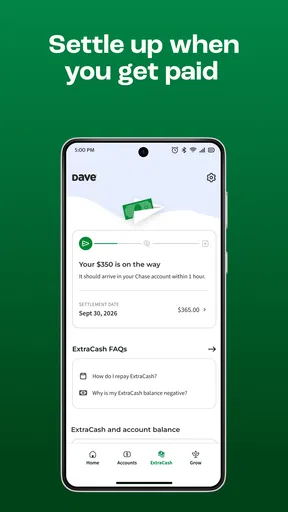
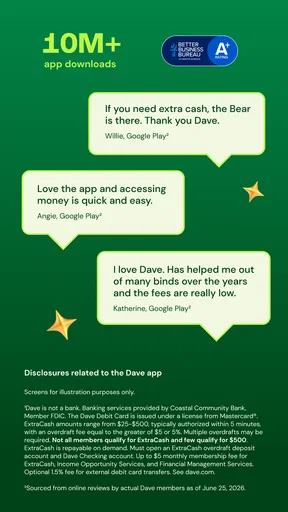
 Analysis by AppCompare
I’d judge Dave less by the promise of a quick cash advance and more by whether it helps you handle the days between paychecks with a clearer plan. That distinction matters: short-term access to money can ease a timing problem, but it cannot make an expense disappear. Used thoughtfully, Dave: Credit, Cash & Money App can be a practical part of a financial routine; used automatically whenever the balance gets tight, it may only postpone the same stress. My advice is to decide what job you want it to do before relying on it.
Start with a repeatable payday routine
A useful baseline is to check your upcoming bills and everyday spending before deciding whether an advance is necessary. If a charge is due before your next paycheck, compare its date with the money you expect to have available. That simple check helps separate a genuine timing gap from a budget shortfall that needs a different fix. Dave’s cash-advance option can be relevant to the first situation, but it is not a substitute for income or a long-term spending plan.
For example, imagine a grocery run and a utility bill landing a few days before payday. I’d first look at what has already been spent and what still needs to clear, then consider whether an advance would cover that specific gap. I would avoid treating the available amount as extra spending money. A clear purpose and a plan for the next paycheck make the service easier to use responsibly, while leaving the rest of the budget intact.
Check the details before you depend on an advance
Dave’s headline offer is access to as much as $500, but I would not build a bill-payment plan around assuming that the full amount will always be available when needed. Before depending on any advance, review what the app shows for your own account, including the amount offered, timing, and repayment details. Those are the practical terms that matter in the moment. A feature’s maximum is not the same as a guaranteed amount for every user or every situation.
The app’s summary emphasizes avoiding hidden fees, but I still recommend reading each choice presented during a transaction rather than tapping through quickly. If an optional contribution or another cost is shown, decide whether you want it and check the final amount before confirming. That small pause is a good habit in any money app: it keeps a supposedly quick fix from becoming a charge you did not mean to accept.
Think about what happens after repayment, too. If repaying an advance would leave too little for food, transport, or another essential before payday, the advance may simply move the shortage forward. I find it more useful to ask, “Will this solve the timing problem without creating a worse one next week?” than to focus only on how much cash is available today.
Make spending tracking useful, not noisy
Dave’s spending tools are most helpful when you use them to answer a specific question: what is taking more of my money than I expected? Linking an account can make transactions easier to review, but a list of purchases is only useful if you actually look at it. I’d check in at a regular time—perhaps when reviewing bills—rather than opening the app repeatedly without a decision in mind.
Worth Reading Before You Choose

EA SPORTS FC Mobile 26 Is a Bigger Football Game, but It Takes Time

Flipboard Shows What News Apps Must Do Beyond the Feed

Switching to Android Auto Means Rethinking Your Driving Routine

Google Calendar Makes a Crowded Week Easier to Manage

Ludo King Makes the Most of the Minutes Between Plans

Baby Panda World Brings Quick Play to Modern Phones, but Its Game Library Feels Busy
One practical habit is to notice recurring charges and small purchases that cluster around the same part of the month. You do not need to judge every coffee or snack; the point is to spot patterns that compete with essentials. If you see a subscription or routine expense you no longer value, that gives you a concrete action. If the numbers already match your priorities, there is no need to force a cut just because a budgeting screen exists.
Account linking also means the app’s view depends on the financial activity it can access. If a transaction looks unfamiliar or a balance does not seem current, check the underlying bank account before making a decision. I would treat the app as a convenient place to review money, not as a reason to stop checking official account records or statements. That extra verification is especially sensible before scheduling a payment or counting on a balance.
Use credit-building with patience
The credit-building option may appeal if you want a structured way to work on your credit history, but it is not an instant score repair. I would first make sure I understood the amounts, timing, and reporting terms shown in the app, then choose a payment routine I could maintain. Consistency matters more than making an ambitious commitment that becomes difficult during a tight month.
It is also worth keeping credit goals separate from cash-flow needs. An advance addresses short-term access to money; a credit-building tool is aimed at a longer-term credit outcome. Combining both without a budget can make it harder to see what each activity is doing for you. If your immediate priority is reducing debt or covering a persistent gap between income and expenses, focus on that problem first and compare options that directly address it.
Know when a bank account is the right fit
Dave includes banking features, and the original appeal described here is a bank account without a minimum balance requirement and access to a large fee-free ATM network. That may be convenient if you want everyday banking alongside the app’s other tools. Still, convenience is not the same as a perfect match: I would compare the account’s current terms with the bank account you already use, especially for the transactions and services you rely on most.
If you mainly want a place to deposit pay and withdraw cash, check whether the account fits your usual routine before moving your finances. Consider where you need ATM access, how you manage bills, and whether keeping another account would make your money easier or harder to track. There is no need to switch everything just to try one feature. Starting with a limited role can make it easier to judge whether the account genuinely simplifies your setup.
Your Go-To Financial Sidekick
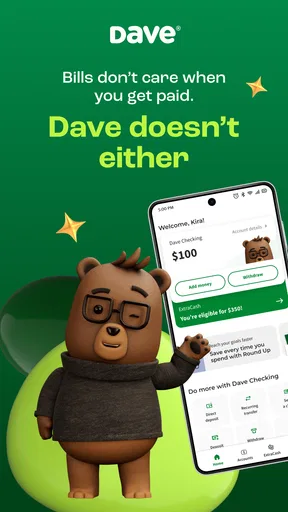
First things first, let’s talk about what Dave: Credit, Cash & Money App is all about. This app is designed to help you manage your finances with a bit of flair. It's not just about borrowing money; it's about giving you the tools to keep your finances in check. Think of it as a financial Swiss Army knife. You can get a cash advance, monitor your spending, and even build your credit. Pretty neat, right?
Cash Advances Without the Hassle
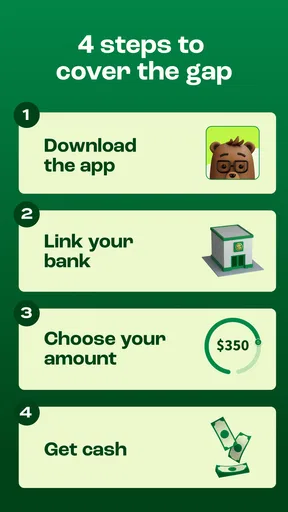
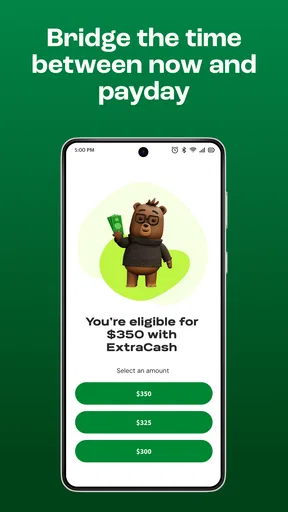
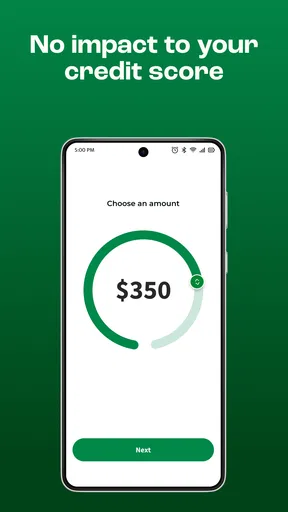
One of the standout features of Dave is its cash advance service. If you’re ever in a pinch, Dave lets you access up to $500 without the anxiety of high interest or late fees. It’s like borrowing from a friend, but better because there’s no awkwardness involved. You just pay a small tip if you want, and voila, you’ve got the cash you need right in your account.
Stay on Top of Your Spending
Dave also offers a nifty budgeting tool. You link your bank account, and it helps track your expenses, so you know where your money is going. It’s like having a mini financial advisor in your pocket, nudging you when you’re maybe spending a bit too much on those double-shot lattes. It keeps things real and helps you stay financially healthy.
Building Credit, the Easy Way
Now, here’s something you don’t see every day in a finance app: a way to build your credit without the usual headaches. Dave offers a credit-building tool that reports to major credit bureaus. You’re essentially paying small amounts to build up your credit score over time. It’s a slow and steady win, but hey, who doesn’t love a good underdog story?
Banking Made Simple
Dave takes things up a notch with its banking features. You can open a bank account with no minimum balance required. Plus, you get access to over 32,000 fee-free ATMs. It’s a bank account with the perks you actually need, minus the typical fees that always seem to pop up at the worst times.
A Community That Cares
What really sets Dave apart is its community-driven ethos. The company has a mission to help its users avoid overdraft fees and take control of their finances. There’s a real sense of community support here; people aren’t just numbers. You’re more like part of a big, slightly nerdy family, all trying to win at the finance game.
While using Dave, you get the feeling that the app genuinely wants to help you out. It’s intuitive, user-friendly, and doesn’t bombard you with confusing financial jargon. It’s like a breath of fresh air in the world of finance apps.
Who benefits most, and what to compare
Dave is best suited to someone who wants several money-management tools in one place and expects to use them deliberately: checking spending, considering an occasional advance, or working toward a credit goal. It may be less suitable if you want only a basic budget, already have a bank that handles your needs well, or are looking for a dependable source of ongoing borrowing. In those cases, a standard budgeting app, your existing bank’s tools, or a longer-term plan for balancing income and expenses may be a better fit.
Compared with a traditional bank app, Dave brings short-term cash access and credit-building into the same experience as spending oversight. A bank may be the stronger choice for customers who prioritize a broad set of established account services, while a standalone budgeting tool may be preferable if tracking and planning are all they need. I would compare the actual terms and everyday workflow, not just the number of features: the best choice is the one you can understand and use without losing track of what you owe or when money is due.
What to expect before installing
Dave is a free finance app from Dave Operating LLC, with an Everyone age rating. It has an average rating of 4.6 from around 601,000 ratings and more than 10 million installs, so it has reached a substantial audience. Those figures can help establish that it is widely used, but they cannot tell you whether its particular tools fit your finances. I’d treat them as context, then make the decision based on the features and terms that appear for my own account.
The app first released on April 24, 2017, and its current version is 4.2.1, with Android 9 as the minimum operating-system requirement. If you are installing on an older phone, check compatibility before making plans around it. And regardless of your device, take a moment to review the account information and choices shown during setup; a finance app is most useful when you know what you are connecting and what actions you are authorizing.
One worthwhile way to test the app is to begin with a low-stakes task, such as reviewing spending, before relying on an advance or changing where your paycheck goes. That gives you time to learn how the screens organize information and whether the app’s view matches your own records. Keep the first few checks simple: confirm a balance against your bank, identify an upcoming bill, and see whether the tracking helps you make a real decision. If it does, you have a reason to keep using it; if not, you have learned that without making a major change.
It also helps to decide in advance what would make you stop using a feature. For example, if an advance would leave your next pay period too tight, do not take it just because the option is visible. If tracking takes more effort than it saves, return to the method that works for you. I value that kind of boundary because a money tool should support a plan, not become the plan itself.
So, is Dave: Credit, Cash & Money App worth downloading? If you’re looking for an app that’s got your back with cash advances, helps you budget, and even assists in building your credit, then absolutely yes. It’s like having a financial mentor on your phone. The app might not solve all your money problems, but it sure does make managing them a whole lot easier. Go ahead, give it a shot, and see how it can make your financial life a little less stressful.
Pros
- Instant cash advances up to $500.
- No late fees or interest charges.
- User-friendly interface and design.
- Automatic budgeting features.
- Seamless integration with bank accounts.
Cons
- Requires a subscription for full features.
- Limited to certain bank accounts.
- No credit-building services available.
- Cash advance limits may vary per user.
- Customer service can be slow to respond.
FAQs for Dave: Credit, Cash & Money App
What is Dave: Credit, Cash & Money App?
Dave is a financial services app designed to help users manage their finances more effectively. It offers features such as cash advances, budgeting tools, and credit-building services. The app aims to provide an alternative to traditional banking by offering no-interest loans and easy-to-understand financial insights.
How does the cash advance feature work in Dave?
Dave provides cash advances up to $100 to help users cover unexpected expenses without incurring overdraft fees. Users can request an advance through the app, which evaluates their eligibility based on factors like income and spending habits. The advance is then deposited into the user's linked bank account.
Is Dave safe to use for financial transactions?
Yes, Dave employs bank-level security measures to protect users' personal and financial information. The app uses encryption and secure servers to ensure data is safeguarded. Additionally, users’ information is never shared with third parties without consent, providing an extra layer of privacy and security.
Are there any fees associated with using Dave?
While Dave doesn’t charge interest on cash advances, it operates on a subscription model, which costs a nominal monthly fee. Additionally, there may be optional fees for expedited cash advances. Users should review the fee structure in the app to understand any potential costs involved in using its services.
Can Dave help improve my credit score?
Yes, Dave offers a credit-building feature that helps users improve their credit scores by reporting timely payments to credit bureaus. By linking to a credit-building account, users can automatically contribute a small amount monthly, which is reported as on-time payments, potentially boosting their credit score over time.


